
In this post we describe how to used dbt seed, is a command that load csv files to the database, this function was created for load small files, for example :
- city codes and names
- users id to exclude
- list of companies id and names
- months names in other language
- day names in other language
- small dimensions
- States of sale
- pay method
- type of client
- type of sale
Example of DBT seed
In our case, for only a example we use dbt seed to load the data from csv files.
The files are taken from Kaggle, is a example of Hospital Beds Management, the files are :
- patients.csv (list of patients)
- services_weekly.csv (patient demand)
- staff.csv (List of doctors, nurses,..)
- staff_schedule.csv (weekly staff presence)
Patients.csv
This file have the data of a patient like name and age, also have the service that the patient take and the satisfaction of that service of the hospital.
Columns of this file are :
- patient_id : unique patient id
- name: name of the patient
- age : age of the patient
- arrival_date : arrival date of the patient in the hospital
- departure_date : departure date of the hospital
- service : service that the patient requested
- satisfaction : satisfaction of the service
Services_weekly.csv
This file have the available beds , patient request , patient admitted and patients refuse for a certain week and month also we have the staff morale the patient satisfaction:
Columns :
- week : number of week
- month : number of month
- service : hospital service
- available_beds : beds available
- patients_request : number of patients request
- patients_admitted : number of patients admitted
- patients_refused : patient refuse for the hospital
- patient_satisfaction : patient satisfaction
- staff_morale : morale of the staff
- event : event of the patient
staff.csv
In this file we have the data of hospital’s staff like name, role and service
- staff_id : unique id for a staff member
- staff_name : name of a doctor nurse ..etc
- role : role of the staff
- service : service that staff provided
staff_schedule.csv
This file have the schedule of the hospital’s staff
- week : number of week
- staff_id : unique id for the staff
- staff_name : staff name
- role : staff role
- service : service that the staff provide
- present : if the satff is available that week
Load the files
First we put the files in the seed folder :
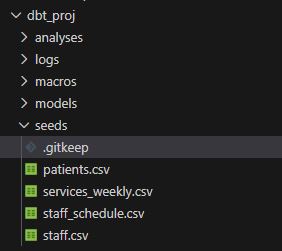
after that we open a terminal in VS code and execute the command :
dbt seed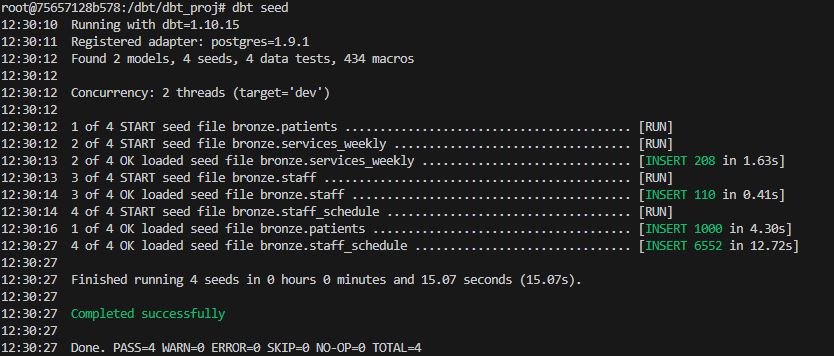
the command will load the data in our database
we can check this with DBeaver
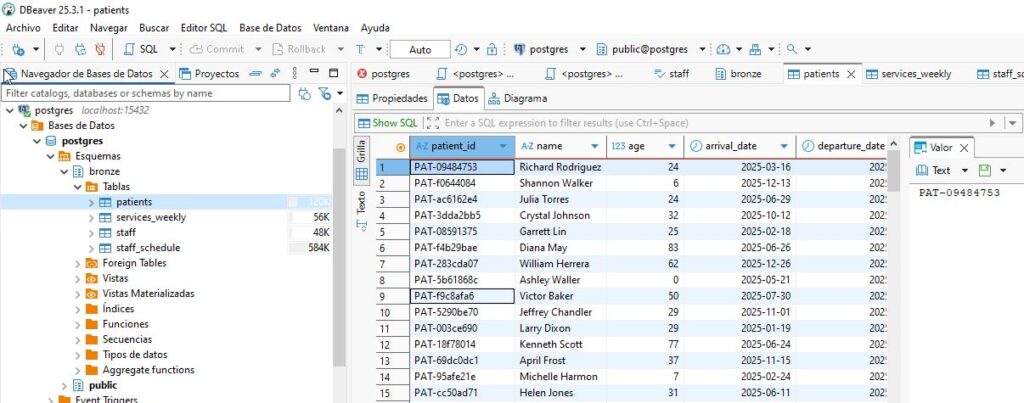
we define our example with medallion architecture and we will load the raw data in our database in the bronze schema.
Links :
https://docs.getdbt.com/docs/build/seeds
Leave a Reply
You must be logged in to post a comment.