I gonna to explain in many post how to create a project using DBT-Core to transformm data, postgresql to save the data and Metabase to show the data in dashboards. For this example I gonna to use VS code y Dev container to develop, first i gonna to explain how to setup the Dev Container.
Install dbt core vscode Dev Container
First we have to create a folder that will contain all our code:
mkdir dbt_newcd dbt_newmkdir .devcontainerin the folder ,devcontainer we will put all the files to configurate the dev container
Files to create for our dev container :
- devcontainer.json
- docker-compose.yml
- DockerFile
- requirements.txt
devcontainer.json
{
  "name": "dbt-proyecto",
  "dockerComposeFile": "docker-compose.yml",
  "service": "dbt_2",
  "workspaceFolder": "/dbt/",
  "shutdownAction": "stopCompose",
  "settings": {
        "terminal.integrated.defaultProfile.linux#": "/bin/bash",
        "python.pythonPath": "/usr/local/bin/python",
        "python.languageServer": "Pylance",
        "files.associations": {
            "*.sql": "jinja-sql"
        }
      },
  "remoteUser": "root"
}
docker-compose.yml
services:
  dbt_2:
    build:
      context: ..
      dockerfile: .devcontainer/DockerFile

    volumes:
      - ..:/dbt:cached

    command: sleep infinity

    links:
      - "db:database"

    user: root

  db:
    image: postgres:17.0
    restart: always
    volumes:
      - postgres-data:/var/lib/postgresql/data
    environment:
      POSTGRES_USER: postgres
      POSTGRES_DB: postgres
      POSTGRES_PASSWORD: postgres
    ports:
      - "5432:5432"
volumes:
  postgres-data:
DockerFile
FROM python:3.11


COPY .devcontainer/requirements.txt /tmp/pip-tmp/requirements.txt
RUN pip3 --disable-pip-version-check --use-deprecated=legacy-resolver --no-cache-dir install -r /tmp/pip-tmp/requirements.txt \
    && rm -rf /tmp/pip-tmp

ENV DBT_PROFILES_DIR=/dbt
requirements.txt
dbt-core==1.10.13
dbt-postgres== 1.9.1
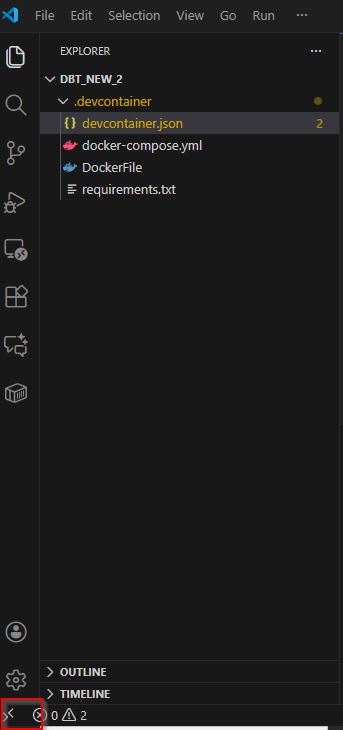
In VS code click on the bottom corner
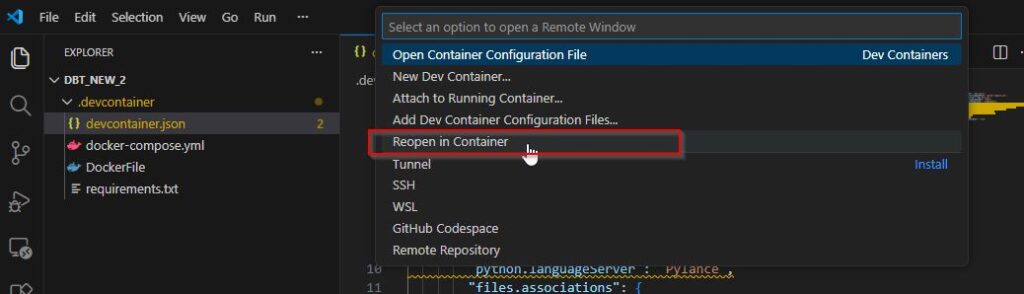
Then click in reopen in container
Links:
https://docs.getdbt.com/docs/core/installation-overview
https://code.visualstudio.com/docs/devcontainers/create-dev-container
Leave a Reply
You must be logged in to post a comment.